
‘In Support Of’ options briefly explain the cause of a fundraiser to the general public.
For example, “In Support Of Cancer Research”. Admin users have the ability to pre-set ‘In support of' options which fundraiser creators on their site may choose from.
The ‘In Support of' field can also be free-text format. This depends on the configuration of your site.
‘In Support of’ options are displayed on both:
-
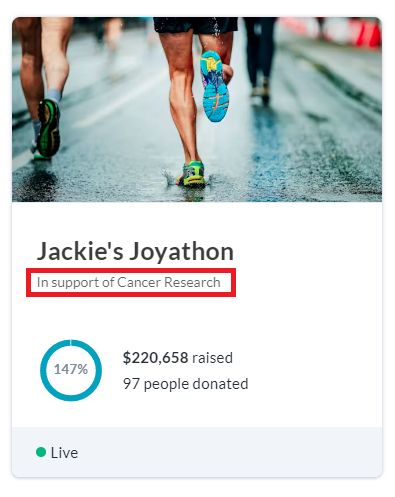
The fundraiser tile (on the home page)…
-
…and the Main Fundraising Page itself, underneath the title of the fundraiser.
.png?cb=c23a88c67a0c0d7ce1b736af6450a6c7)
Setting up ‘In support of’ options
To add ‘In Support of’ options, follow the steps below:
-
Log In to your CrowdChange site.
-
Click Profile → Admin in the top right corner.
-
Go to Fundraisers Settings → In support of on the left sidebar.
-
Enter the Name and Custom ID for each option you would like to have and click Add.
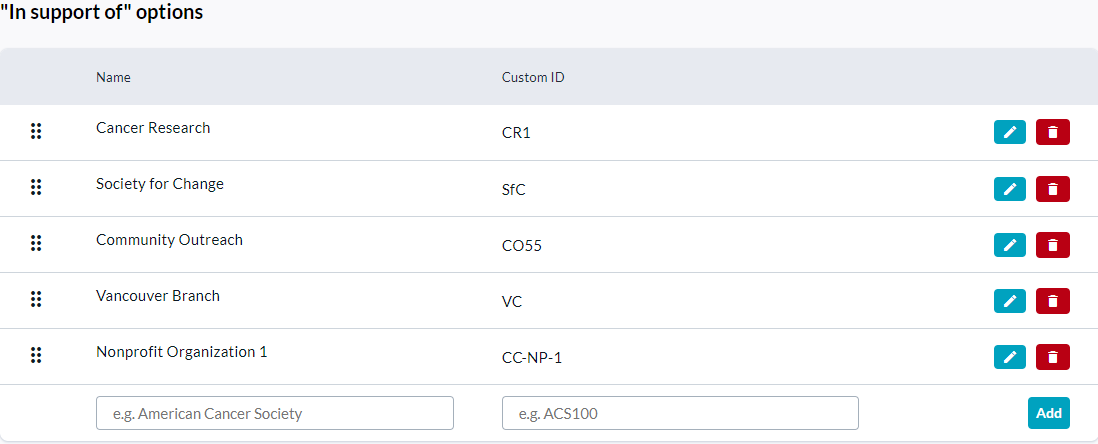
Example Options
Editing ‘In support of’ options
-
Click on the pencil icon next to the option you want to update.
-
Make any necessary changes and click the green tick icon.
Deleting ‘In support of’ options
-
Click on the trash can icon next to the option you want to delete.
-
In the popup that appears, click Yes.
An ‘In support of’ option which has been previously used by a fundraiser can be restored after being deleted by clicking the green return arrow icon next to said option.
Personal and Team Pages also display ‘In Support of’ options, and depending on the settings of your site, personal page owners may or may not be able to select their ‘In Support of' option of choice.